
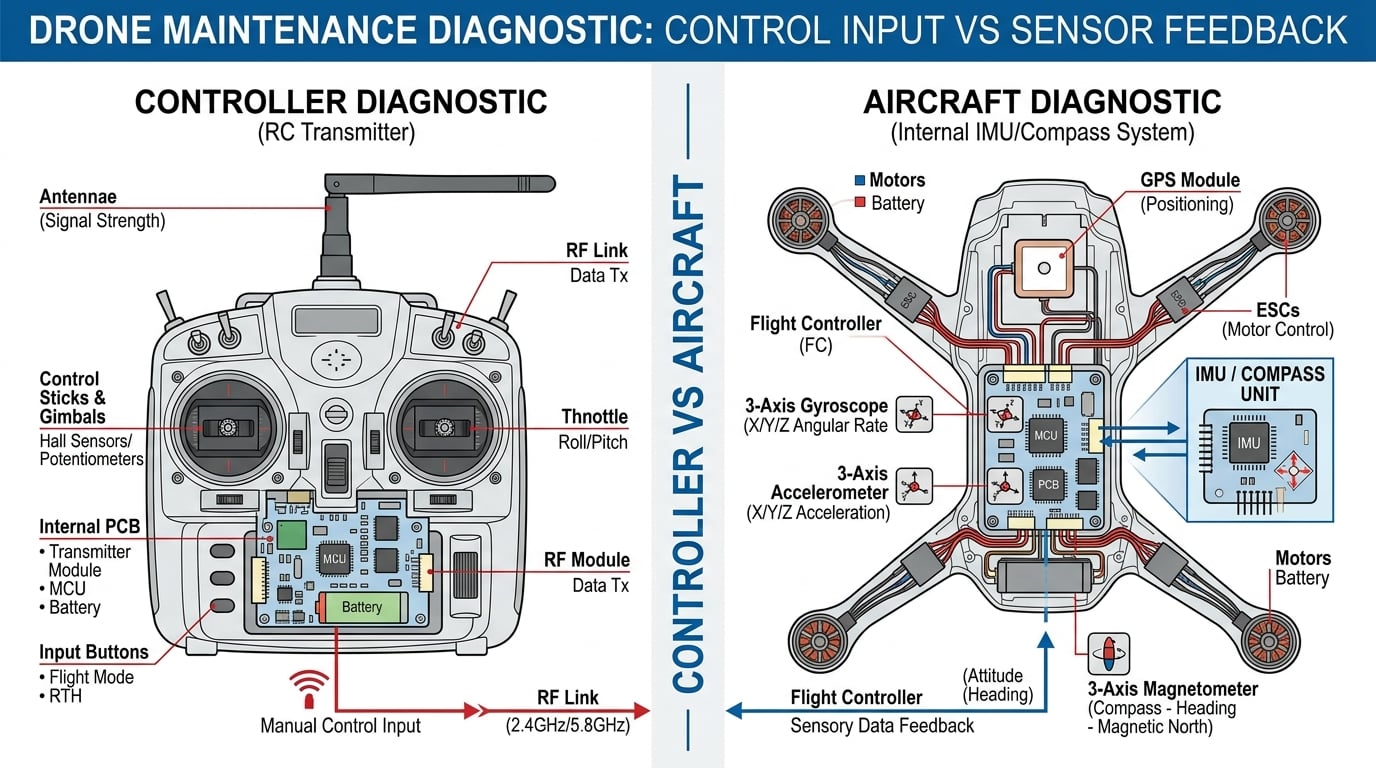
Drone drift is one of the most frustrating problems a pilot can face. Your aircraft lifts off, hovers for a second, then slowly slides sideways, forward, or backward without any input from your sticks. Before you start recalibrating sensors or ordering replacement parts, you need to know one thing: is the drift coming from your controller or from the aircraft itself? In this guide, I’ll show you exactly how to tell if drone drift is a controller problem or an aircraft problem, using a quick home test and a step-by-step diagnosis you can run before spending a cent on repairs.
Table of Contents
Drone Drift Basics: What Every Pilot Should Know First
Drone drift is the term pilots use when an aircraft slowly moves away from its intended hover position without any stick input. A perfectly tuned drone should hold its position with minimal correction, whether you’re flying a DJI Mini indoors or a custom-built FPV quad outside.
The 1:1 rule for drones is simple guidance that matters here. For every 1 mile of altitude, you should keep at least 1 mile of horizontal distance from obstacles or people. This isn’t directly about drift, but it explains why drift becomes dangerous fast. A small drift at low altitude can turn into a crash within seconds.
Drone drift has only two real sources. Either your controller is sending an incorrect signal (or your aircraft is misinterpreting a correct signal), or the aircraft itself has a hardware or sensor issue. Knowing which one you’re dealing with is the difference between a 5-minute fix and a full-day troubleshooting session.
The 30-Second Test: Is It Your Controller or Your Aircraft?
Before you dive into calibration menus or pull propellers off, run this 30-second test. It works for any drone, from a DJI Mavic to a Betaflight FPV build. I use this method with our team’s test fleet whenever we get a drift report.
Step 1: Power On Without the Props
Remove the propellers or switch to a safe testing mode. Power on the aircraft and the controller, then connect them as you normally would. Place the aircraft on a flat, level surface.
Look at the aircraft’s attitude indicator in your app or goggles. With no input on the sticks, the artificial horizon should sit perfectly level. If the drone thinks it’s tilted even though it’s flat on a table, you have an aircraft problem, not a controller problem. Your sticks aren’t doing anything, so the signal isn’t the issue.
Step 2: Center the Sticks and Watch the Inputs Display
Now look at the controller’s input monitor. Most apps (DJI Fly, DJI Assistant 2, Betaflight Configurator) show your stick positions and channel values. With both sticks centered, every channel should read 1500 microseconds (or 0% in DJI’s scale).
If the channel values drift up or down while your sticks are physically centered, your controller has a calibration problem. This is a controller issue. If the channels read perfectly centered and the aircraft still drifts, the problem is on the aircraft side.
Step 3: The Hover Test in Place
Re-attach the props and lift off in a windless indoor space or a calm outdoor spot. Let the drone hover for 30 seconds without touching the sticks. Watch which direction it drifts.
Now correct the drift with the opposite stick input, then immediately release the stick and watch. If the drone returns to drifting in the same direction, that’s aircraft drift. If the drone returns to drifting in the direction you just corrected, that means your trim is offset and the controller is sending an incorrect center position.
Controller Problem Signs: How to Spot a Transmitter Issue
Controller-side drift shows up in very specific ways. Here are the symptoms our team watches for whenever a pilot reports drift that started suddenly or only happens in one direction.
Drift Direction Changes When You Move the Sticks
If your drone drifts in different directions depending on how you move the sticks, you’re seeing the controller’s trim settings at work. Trim offsets stay active even after you let go of the sticks. Many pilots accidentally bump trim switches during transport or while grabbing the controller.
Reset all trims to center before you do anything else. On most controllers, this is a quick press of the trim buttons until they snap back to neutral. After resetting, do another hover test. If the drift is gone, you just had a stuck trim, which is a controller problem fixed in 30 seconds.
Channel Positions Aren’t Centered
Subtrim and channel midpoint settings can drift over time, especially on controllers that have been dropped or stored in hot conditions. When your throttle, yaw, pitch, or roll channel doesn’t sit at exactly the midpoint (1500 microseconds in PWM, or 0% in SBUS), the flight controller will think you’re asking for input even when sticks are centered.
Check your subtrim settings in the controller’s menu or in Betaflight/CleanFlight. The fix here is mechanical: re-center the gimbals using the calibration wizard. If your controller has removable springs or tensioners, check those too. A loose spring can let a stick rest slightly off-center.
Sticks Feel Worn or Mushy
Old gimbals develop play in the potentiometers. A stick that feels loose or returns to center unevenly can cause drift that comes and goes. The fix is either a deep gimbal cleaning (compressed air + contact cleaner) or a full gimbal replacement. On entry-level controllers, replacement is usually cheaper than repair.
Range Issues at the Same Time
If your drone drifts and you’re also seeing video breakup, lag, or a reduced control range, the issue is in the radio link. This is still a controller problem, but it sits deeper in the system. Check antenna connections, refresh the binding between the controller and aircraft, and inspect the receiver antenna for damage.
Aircraft Problem Signs: How to Spot a Drone Hardware or Sensor Issue
Aircraft-side drift usually means sensors, motors, or props. The symptoms are different from controller drift, and they tend to follow a pattern. Here’s what to look for.
Drift Starts After Calibration, Not Before
When a drone drifts only after a recent IMU or compass calibration, the calibration itself is the problem. This happens when the aircraft is calibrated on an uneven surface, near metal, or while it was still moving. The fix is a fresh calibration on a known-level surface, away from cars, rebar, or speakers.
For DJI drones, run the IMU and compass calibration through the DJI Fly app or DJI Assistant 2. For FPV quads, run accelerometer calibration in Betaflight with the aircraft on a level bench. Make sure the aircraft is completely still during the calibration count.
Drift Direction Changes with Wind
If your drone only drifts in one specific direction regardless of wind, that’s an aircraft issue. Wind-related drift comes from the wind itself and your aircraft’s GPS or vision positioning struggling to compensate. Calibration won’t fix wind drift, but a clean IMU and a fresh GPS lock will make the drone hold position much better.
GPS-enabled drones need at least 8 to 10 satellites before they can hold position accurately. If you’re flying with weak GPS (urban canyons, indoors, near tall trees), expect drift even with a perfectly calibrated aircraft.
One Motor Spins Faster or Louder
Motor problems cause drift in very obvious ways. A damaged bearing, a bent motor shaft, or a clogged motor can make one prop spin slightly slower or produce less thrust. The drone leans toward the weak motor and drifts that direction.
Test by hovering the drone at eye level in a calm space and listening. All four motors should sound the same pitch and volume. If one sounds rough, gritty, or louder, that motor needs attention. You can also do a motor test in Betaflight (without props on) to see if any motor draws a noticeably different current.
Propellers Are Damaged or Unbalanced
This is the most common cause of aircraft drift in our team’s experience. A small nick, hairline crack, or balance issue on a single prop creates vibration that the IMU reads as tilt. The flight controller then tries to correct tilt that isn’t really there, and the drone drifts.
Inspect every prop closely. Run your finger along the leading edge to feel for chips. Spin each prop on a pencil and watch for wobble. Even slightly unbalanced props cause drift on FPV quads and consumer drones alike. Replace props in matched sets, never just one.
Frame or Body Damage
A bent arm, a cracked frame, or a shifted battery mount changes the aircraft’s center of gravity. The flight controller will hold level based on its own IMU, but the actual thrust points no longer line up with that level. The result is drift, usually in a specific direction.
Check your frame for cracks. Make sure your battery is centered and the strap is tight. On modular drones like the DJI Mini series, check that the arms are fully unfolded and locked.
Step-by-Step Diagnosis: From Quick Test to Confirmed Fix
If the 30-second test didn’t immediately point you to a controller or aircraft problem, walk through this full diagnostic in order. Each step is fast and reversible.
- Reset controller trims to zero on all four channels. Re-hover and watch for drift. If drift is gone, the controller’s trim was the issue.
- Re-bind the controller to the aircraft to rule out a bad connection. Re-hover and watch.
- Calibrate the gimbals using the controller’s built-in calibration routine. Re-hover and watch.
- Recalibrate the IMU and compass on a level surface, away from metal. Re-hover in a calm space.
- Inspect and replace propellers with a known-good set. Re-hover and watch.
- Do a motor test (props off) and listen for roughness or uneven current draw.
- Update the aircraft firmware to the latest stable release. Re-hover and watch.
- Check the frame and battery for damage or shifting. Re-hover and watch.
If drift persists after all eight steps, the problem is deeper: a failing IMU, a damaged flight controller board, or a motor that needs replacement. At that point, send the aircraft to the manufacturer or a qualified repair shop.
When to Seek Professional Repair
Some drift problems go beyond a home fix. If your drone drifts in multiple directions, the IMU is likely failing. If a motor is rough even after a deep clean, the bearings are probably shot. If the controller has visible damage to a stick assembly or the antenna, the radio link may be compromised.
DJI drones under warranty should go back to DJI directly. Aftermarket FPV quads can be serviced by any qualified FPV shop, and the parts are usually inexpensive. Whatever the platform, don’t keep flying a drone that drifts unpredictably. Drift is the leading warning sign before a flyaway or a crash.
FAQ
Why does my drone keep drifting?
Your drone keeps drifting because either the controller is sending an incorrect center signal (trim, subtrim, or gimbal issue) or the aircraft has a sensor, motor, or propeller problem. Run the 30-second test in this guide to find out which one.
What is the 1 1 rule for drones?
The 1:1 rule says that for every 1 mile of altitude, you should keep at least 1 mile of horizontal distance from obstacles and people. It helps pilots avoid the small drift errors that can quickly turn into collisions at higher altitudes.
What are common drone repair issues?
Common drone repair issues include damaged propellers, worn motor bearings, failing IMU sensors, broken gimbal potentiometers in the controller, cracked frames, and outdated firmware that causes sensor drift.
Why is my drone not responding to the controller?
Your drone may not be responding to the controller because of a broken bind, a damaged receiver antenna, a low controller battery, or a stuck gimbal. Re-bind the link, check the batteries, and recalibrate the gimbals to fix the most common causes.
Final Thoughts on Diagnosing Drone Drift
Knowing how to tell if drone drift is a controller problem or an aircraft problem saves you hours of frustration. Start with the 30-second test, work through the controller signs, then move to the aircraft signs. In most cases, drift comes down to trim, props, or a quick IMU calibration. When those don’t solve it, follow the eight-step diagnosis in order. Our team has used this exact process on dozens of consumer and FPV drones, and it correctly identifies the source of drift in under 10 minutes for most cases. If you’ve worked through all of it and the drone still drifts, stop flying and send it for service. Drift is a warning sign you don’t want to ignore.