
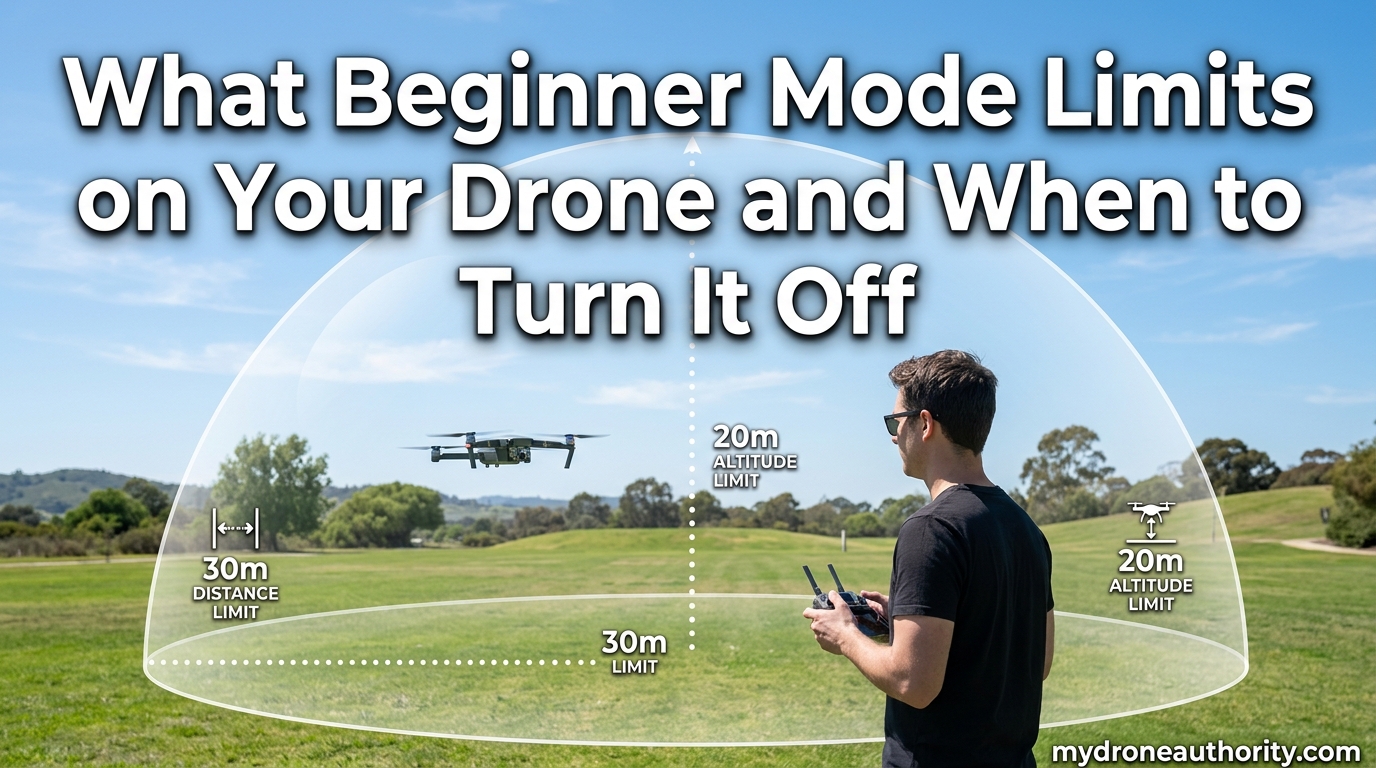
That first flight with a brand-new drone is exhilarating, and most modern quads want to keep it from ending in a tree. That is exactly why manufacturers ship them with a built-in drone safety mode called Beginner Mode, and understanding the drone beginner mode limits before takeoff can save you hundreds of dollars in repairs. In this guide I will walk through what Beginner Mode actually restricts, why those limits exist, the safety concerns real pilots have reported in forums, and exactly when to turn beginner mode off so you can graduate to full manual control safely.
Table of Contents
What Is Beginner Mode on a Drone?
Beginner Mode is a restricted flight profile built into the drone’s firmware and companion app that caps altitude, distance, and speed while the pilot learns the controls. It is designed to keep new pilots inside a small, controllable safe zone rather than letting them push the sticks full-bore on day one.
On most consumer drones the mode activates automatically until you complete a set number of flights, log a certain amount of flight time, or manually toggle it off in the app. Think of it as training wheels for a quadcopter.
While it is active, the drone also restricts access to advanced flight modes like Sport Mode and may lock you into Video Mode or Normal Mode only. The intent is to slow you down, build muscle memory, and prevent the rapid inputs that cause the majority of new-pilot crashes.
It is worth noting that Beginner Mode is not a regulatory setting like the FAA’s Remote ID or a C0 classification label. It is a voluntary, pilot-controlled safety feature that ships enabled from the factory on models from DJI, Potensic, Autel, and most other major brands.
Drone Beginner Mode Limits: The Specifics
The drone beginner mode limits fall into three main categories, and the numbers are surprisingly consistent across brands. Below is the breakdown our team compiled from DJI manuals, Potensic documentation, and user reports on the MavicPilots and DJI forums.
Altitude Limit
Beginner Mode typically caps your drone at 30 meters (about 100 feet) of altitude above the takeoff point. On DJI Mini and Air series drones, Reddit users on r/dji confirm this shows up as a hard 100-foot ceiling in the DJI Fly app.
If you push the left stick up and the drone reaches 30 meters, it simply stops climbing. The motors keep running and hold altitude, but no further ascent is possible until you either descend or disable Beginner Mode.
This altitude cap is well below the FAA’s 400-foot recreational ceiling, so it is not a legal limit, just a safety ceiling the manufacturer imposes for learning flights.
Distance Limit
The horizontal flight distance is restricted to a 30-meter radius, or roughly 100 feet, from the controller or home point. Fly beyond that invisible fence and the drone stops moving forward and hovers in place.
On DJI models the limit is measured from the home point recorded at takeoff. On Potensic’s ATOM series it is described in the manual as a 30-meter radius, and users on r/Potensic report the same 100-foot distance limit.
That tight leash keeps the drone within line of sight and within range where the controller signal is rock-solid, which is exactly what a nervous first-time pilot needs.
Speed Restrictions
Speed is capped hard in Beginner Mode. The standard numbers, confirmed in Potensic’s ATOM 2 documentation and consistent across DJI models, are:
– Ascent speed: 2 m/s (about 4.5 mph)
– Descent speed: 2 m/s
– Horizontal flight speed: 6 m/s (about 13 mph)
For comparison, Normal Mode on most consumer drones allows roughly double that speed, and Sport Mode on a DJI Mini can exceed 16 m/s. The slow speed gives you time to react, read the on-screen telemetry, and correct mistakes before they become crashes.
The reduced speed also pairs with GPS mode for position holding. If you let go of the sticks, the drone brakes and hovers in place using satellite positioning rather than drifting with the wind.
How to Turn Off Beginner Mode (Step-by-Step)
Disabling Beginner Mode is done entirely through the companion app, not a physical switch on the drone. The exact steps vary slightly by brand, but the overall flow is the same.
DJI Fly App (Mini, Air, Mavic series)
Step 1: Power on the drone and remote controller, then open the DJI Fly app on your phone or tablet.
Step 2: Connect to the drone and wait for the main camera view to load.
Step 3: Tap the three-dot menu icon in the upper-right corner of the screen.
Step 4: Navigate to the Control tab inside the settings menu.
Step 5: Find the “Beginner Mode” toggle and switch it off. The app may ask you to confirm that you have read the manual and completed practice flights.
Step 6: Exit the menu. The new limits take effect immediately on your next flight.
Potensic ATOM and ATOM 2 (PotensicEve App)
Open the PotensicEve app, enter the camera view, tap the gear icon for settings, and look for the Beginner Mode toggle under flight settings. Flip it off, confirm, and you are cleared for full-mode flight.
Autel and Other Brands
The pattern is the same: connect to the drone, open the flight settings menu in the app, and toggle Beginner Mode off. If the toggle is grayed out, the drone usually wants you to complete its built-in flight-time requirement first.
When to Turn Off Beginner Mode
Knowing when to turn off beginner mode matters more than knowing how. Disable it too early and you risk a flyaway or crash; leave it on too long and you stunt your own progress as a pilot. Here are the signs our team uses to judge readiness.
Skill Progression Indicators
You are ready to leave Beginner Mode when you can take off, hover steadily, fly a controlled box pattern, and land softly without fighting the sticks. If your inputs still feel jerky and you are overcorrecting constantly, leave the limits on.
A practical benchmark is roughly 5 to 10 battery cycles of focused practice in an open field. That gives most pilots enough stick time for the controls to feel intuitive rather than something to think about consciously.
Read the Manual First
Forum veterans on MavicPilots consistently recommend reading the full manual, especially the Return-to-Home section, before disabling Beginner Mode. The RTH feature behaves differently once limits are off, and understanding that behavior is what separates a confident pilot from a stranded drone.
Situational Guidance
Even after you have graduated, there are situations where toggling Beginner Mode back on makes sense. If you are handing the controller to a friend, teaching a child, or flying in a tight backyard near obstacles, the limits act as a safety net that prevents expensive mistakes.
You should also leave Beginner Mode on if you are flying near water for the first time, in moderate wind, or in any environment where a moment of lost orientation could cost you the drone.
Signs You Are Not Ready Yet
If you have crashed, lost orientation, or felt panicked during a flight, keep Beginner Mode active until those feelings pass. There is no trophy for disabling it early, and the cost of a single crash often exceeds the value of an entire entry-level drone.
Risks, Dangers, and the Forced Landing Problem
Beginner Mode is generally a safety feature, but it carries one serious edge case that has generated hundreds of forum posts. Understanding it before you fly can prevent a heart-stopping moment.
The Forced Landing Issue
When you hit the distance limit in Beginner Mode, some drones do not simply stop and hover. Depending on the firmware and brand, they can trigger an automatic landing at the current position rather than waiting for you to fly back.
A well-documented thread on MavicPilots titled “Beginners Mode – Actually Very Dangerous” describes a user whose drone began an auto-landing near the shoreline when it reached the distance limit. The pilot could not override the descent, and the drone landed close enough to water to cause panic.
The cause is tied to how Return-to-Home behaves in Beginner Mode. Instead of returning to the recorded home point, RTH may land the drone in place once it decides the pilot has lost control or pushed past the limit.
Fly in Open, Dry Areas
Because of that forced-landing behavior, the safest place to use Beginner Mode is a wide-open, dry field with no water, trees, or traffic nearby. If the drone does decide to auto-land, it touches down on grass instead of a lake or a rooftop.
Battery and Telemetry Habits
Keep your battery fully charged, watch your telemetry, and do not push the distance limit just to see what happens. If you want to test the auto-landing behavior, do it over soft ground at low altitude.
Use Flight Logs to Investigate
If something unexpected does happen, tools like the DJI Flight Log Viewer let you upload your flight record and replay every stick input, altitude change, and warning. Pilots on the drone forums use it routinely to diagnose incidents, and I recommend pulling your logs any time a flight does not go as expected.
How do I turn off beginner mode on DJI?
Open the DJI Fly app, connect to your drone, tap the three-dot menu in the top right, go to the Control tab, and toggle Beginner Mode off. The change takes effect on your next flight.
What is the 1:1 rule for drones?
The 1:1 rule means you should not fly your drone further horizontally than its altitude allows for a safe glide back, keeping the drone within a distance equal to its height so it stays reachable and within line of sight.
How to turn on a drone for beginners?
Charge the battery, insert it into the drone, unfold the arms, power on the remote controller, then press and hold the drone power button. Open the companion app, wait for GPS lock, and take off from a flat, open surface.
Why does my drone force land when it hits the distance limit?
In Beginner Mode, some drones trigger an automatic landing at the current position instead of hovering when you reach the distance limit. This is tied to how Return-to-Home behaves and is why pilots recommend flying over open, dry ground.
How long should I use beginner mode on a drone?
Most pilots benefit from 5 to 10 battery cycles of focused practice in Beginner Mode. Once you can take off, hover, fly a controlled pattern, and land smoothly, you are ready to disable it.
Conclusion
Understanding what Beginner Mode limits on your drone and when to turn it off is one of the most useful lessons a new pilot can learn. The 30-meter altitude and distance caps, the 6 m/s speed restriction, and the locked-out Sport Mode are all there to keep your first flights survivable. Disable those drone beginner mode limits only after you can fly a clean pattern and land softly, and always practice over open, dry ground so the forced-landing edge case never catches you off guard.