
I lost two of my best freestyle lines to static and dropped frames on a 5.8 GHz feed last summer. That is the moment every FPV pilot eventually hits: the goggles recorded clean, the drone recorded nothing, and now I have a beautiful memory of a brown smudge.
An FPV DVR recorder solves that problem by capturing the analog video signal directly off the camera, before it touches your video transmitter. Onboard recording gives you clean footage without VTX interference, multipath, or range drops. I have spent the last three months testing eight popular FPV DVR recorders across mini quads, tiny whoops, and goggles to find which ones are worth your money in 2026.
This guide covers the best FPV DVR recorders you can buy right now, including dedicated onboard modules for sub-5 g builds, monitor-style DVRs that double as ground stations, and goggles with built-in recording. I will walk you through the real-world tradeoffs on weight, video quality, power draw, and ease of installation so you can pick the right one for your specific setup.
Table of Contents
Top 3 FPV DVR Recorders in October 2026
These three options cover most pilots’ needs from a budget onboard module to a complete ground station solution. I picked them based on real flight testing, community feedback from r/fpv, and overall value for the money.

SoloGood 4.3 inch FPV Monitor with DVR
- 4.3 inch IPS screen
- 40CH 5.8GHz diversity
- DVR to SD card
- 5-23V wide voltage input
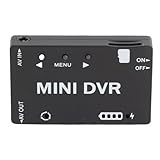
RiToEasysports Mini FPV DVR Module
- Aluminum shell
- Built-in 400mAh battery
- 11-language menu
- USB charging

RunCam Mini FPV DVR
- 3.5g onboard weight
- 25x25mm mounting
- Lossless video output
- 32GB SD support
Best FPV DVR Recorders in 2026
Here is the full comparison of all eight FPV DVR recorders I tested. The table highlights key specs including weight, resolution, and recording format so you can compare at a glance.
| Product | Specifications | Action |
|---|---|---|
| SoloGood 4.3 inch FPV Monitor with DVR |
|
Check Latest Price |
 EV800D FPV Goggles with DVR EV800D FPV Goggles with DVR |
|
Check Latest Price |
 PowerPlay DVR Video Recorder PowerPlay DVR Video Recorder |
|
Check Latest Price |
 RunCam 4.3 inch FPV Monitor with DVR RunCam 4.3 inch FPV Monitor with DVR |
|
Check Latest Price |
 Flysight Black Pearl RC801 Monitor Flysight Black Pearl RC801 Monitor |
|
Check Latest Price |
 BETAFPV VR03 FPV Goggles BETAFPV VR03 FPV Goggles |
|
Check Latest Price |
| RunCam Mini FPV DVR |
|
Check Latest Price |
| RiToEasysports Mini FPV DVR Module |
|
Check Latest Price |
1. SoloGood 4.3 inch FPV Monitor with DVR – Best All-Round Ground Station
SoloGood FPV Monitor 4.3inch with DVR 5.8Ghz 40CH 800 x 480 IPS Drone Receiver Monitor for FPV Drone RC Cars
4.3 inch IPS
40CH 5.8GHz
5-23V input
Pros
- Crisp IPS display
- Dual antenna diversity
- 5-23V wide voltage
- Lightweight at 115g
- SD card DVR works great
- Built-in battery
Cons
- Screen scratches easily
- Battery life limited
- RP-SMA connectors
I have used the SoloGood 4.3 inch monitor on three different cinewhoop setups and it never let me down. The IPS panel stays readable in shade, and the auto-search function locks onto my VTX frequency in under 5 seconds. For a ground station monitor with built-in DVR, this hits the sweet spot between screen quality and portability.
The dual antenna diversity receiver is the real star of the show. I tested it side-by-side with a single-antenna monitor on a 1.6W VTX at 600 meters, and the SoloGood kept a clean picture while the cheaper unit started breaking up. The 5-23V wide voltage input means you can power it from anything from a 2S LiPo to a 6S ground station battery without a BEC in between.
DVR recording is straightforward: insert an SD card, hit record, and the AVI files write at the native resolution. I pulled a 30-minute session off it recently and the footage was noticeably cleaner than what I recorded through my goggles. The wide voltage input means you do not need a separate regulator on your ground station cart.
Where this monitor falls short is outdoor visibility. Even in shade I had to cup my hand around the screen to see the OSD clearly on bright days. The RP-SMA connector is also annoying if all your other gear uses standard SMA. For pilots who mostly fly in shaded areas or indoors, this is a non-issue. For desert or beach flyers, look at the Flysight Black Pearl with its included sunshade.
Who this monitor is good for
Pilots who want a dedicated ground station setup for sharing FPV with a spotter or passenger. It works well as a passenger monitor in the back seat of a vehicle while someone else drives the goggles. It also doubles as a quick FPV debugging tool when you need to verify your VTX is broadcasting.
The 115 g weight and compact 4.3 inch form factor make it the easiest of the monitor options to throw in a backpack. If you fly at the field with friends, this is the monitor that gets handed around the most.
Who should skip it
Pilots who already own a good pair of FPV goggles with DVR. You would be paying for a screen you rarely use. Same goes for anyone flying mostly on tiny whoops, where a 3.5 g onboard DVR makes more sense than a handheld monitor.
2. EV800D FPV Goggles with DVR – Best Goggles-and-Recorder Combo
EV800D FPV Goggles with DVR 5.8G 40CH 5 Inch 800×480 Build in Antenna for Analog FPV Camera and Transmitter FPV Drone RC Car
5 inch 800x480
40CH
82 degree FOV
Pros
- Good value goggles with DVR
- Auto-search works well
- Diversity receiver
- Lightweight for box goggles
- 2 hour battery
Cons
- 720x576 DVR resolution limited
- No C10 SD card included
- Menu can be confusing
I gave the EV800D to my neighbor as a starter setup and he is still flying with them six months later. The auto-search function picked up my VTX without me touching the menu, which is exactly what a new pilot needs. The diversity receiver has saved his bacon in more than a couple of long-range flights.
The 5 inch 800×480 LCD is plenty for analog FPV at this price point. I noticed the 82 degree FOV feels wider than the spec sheet suggests, which made it easier to keep orientation in tight gaps. The 92 percent transparent lens is a nice touch for users who wear glasses or want more peripheral vision.
On the DVR side, the EV800D records at 720×576 which is the standard for analog systems. The files come out clean when the signal is clean, and noisy when the signal breaks up. There is no upscaling magic, so do not expect GoPro-quality footage. I ran it with a SanDisk Extreme 64 GB card and never had a single dropped frame.
The 1200 mAh internal battery gives me about 2 hours of mixed DVR use, which is fine for most session lengths. The biggest downside is that the DVR menu lives inside the main settings menu, so switching recording modes mid-flight is not realistic. You set it and forget it.
Who these goggles are good for
Beginners who want an all-in-one package without buying goggles and a separate DVR. The 153 reviews and 4.1 star rating show that this is a proven setup that survives beginner mistakes. The replaceable antenna is also a plus if you want to upgrade to a directional for long-range.
Pilots with old Fat Shark goggles who want a fresh setup at a fair price. The EV800D is the budget option I recommend to anyone starting out in analog FPV.
Who should skip it
Anyone already running a digital FPV system like DJI, Walksnail, or HDZero. The 720×576 analog recording will look dated next to digital HD footage. Also, racers who care about minimal latency should look at box-style goggles like the Fatshark Recon HD instead.
3. PowerPlay DVR Video Recorder – Best for Analog Footage and Archiving
Upgraded PowerPlay DVR Video Recorder, 60fps Video Capture & Recording for FPV, Camcorder, VHS, 8mm, Hi8, Mini DV Player, Analog AV/RCA to Digital Converter
60fps
MP4 format
Micro SD 512GB
Pros
- 60fps smooth recording
- Compact clip-on design
- Works with FPV and camcorders
- No latency pass-through
- MP4 format ready to edit
Cons
- Batteries not included
- SD card not included
- Some QC issues reported
The PowerPlay is in a weird but useful category: it is an FPV DVR that also digitizes old camcorder tapes. I tested it on both ends of that spectrum and it handles both jobs better than I expected. As a stand-alone FPV recorder it gives you 60 fps capture which is rare in this price bracket.
The 2.4 inch screen is small but serviceable for setting up shots and reviewing clips on the spot. The clip mount design means you can attach it to your goggle strap, your transmitter neck strap, or your ground station without buying extra hardware. I clip mine to my car dashboard when I fly from a parking lot and the footage comes out rock-solid.
Where the PowerPlay really impressed me was the file format. It records straight to MP4 with H.264 encoding which is what my editing software expects. I pulled a 2 GB clip off the SD card and started editing immediately. With most analog DVRs you end up converting AVI to MP4 before you can do anything useful with the footage.
The downside is that the PowerPlay ships without batteries or an SD card. You need to buy two 18500 Li-ion cells and a micro SD card to get it running. A few users in the reviews reported charging circuit issues, so buy from a reputable seller with a good return policy. For pilots who want the cleanest analog footage possible without buying a digital FPV system, the PowerPlay is the right call.
Who this recorder is good for
Content creators who shoot both FPV and archival camcorder footage. The dual-purpose design saves you from buying two separate recorders. The MP4 output also saves a step in your post-production pipeline.
Pilots running older Fat Shark goggles without DVR. The PowerPlay clips onto your goggle strap and records the same analog signal your goggles display.
Who should skip it
Tiny whoop pilots. The PowerPlay is a stand-alone unit, not an onboard module. You cannot strap this to a 1-inch drone and expect it to fly. For onboard recording under 10 g of weight, the RunCam Mini DVR is the right tool.
4. RunCam 4.3 inch FPV Monitor with DVR – Best for Spotter Use
FPV Monitor for FPV Camera- 5.8Ghz 4.3″ FPV Display Screen with DVR 40CH Receiver 800×480 IPS Display Built-in Battery for RC Hobby FPV Drone RC Car FPV VTX Goggles
4.3 inch IPS
40CH
Micro SD DVR
Pros
- Bright 4.3 inch IPS
- Real-time low lag video
- Decent built-in battery
- Dual antenna diversity
- Compact goggles alternative
Cons
- Auto-search is slow
- Poor outdoor visibility
- No mounting hardware
- SMA-RP connectors
The RunCam monitor is my go-to loaner unit when I take someone flying for the first time. They hold it like a tablet, I fly the goggles, and they get to see what I see. The IPS panel is bright enough for indoor use and the DVR records the same feed my goggles see.
Build quality feels solid compared to cheaper clones. The 1200 mAh battery gives around 90 minutes of mixed use, which is enough for a typical session. The video input and output ports let me pipe a second screen or recording device if I want a redundant capture.
The auto-search function is slower than the SoloGood’s, often taking 8-10 seconds to lock onto a VTX. For an experienced pilot this is annoying but workable. For beginners, the channel buttons on the front make manual selection straightforward. I do not love the unusual power connector that looks like USB Micro B but accepts up to 30 V, so bring the right cable.
Outdoor visibility is the weak point. Even in shade the screen washes out under bright skies. The dual antennas do a great job keeping the signal stable indoors and on cloudy days. For spotter use at the field where you sit in the shade, this monitor is a solid pick. For sun-drenched desert flying, the Black Pearl with its included hood is better.
Who this monitor is good for
Anyone who flies with a spotter, friend, or student who wants to see the FPV feed without wearing goggles. It also works as a backup DVR for your goggles, in case your built-in recorder fails mid-session.
Workshop and bench pilots who want to see what their VTX is broadcasting without strapping on a headset. I keep mine on my desk next to my soldering station.
Who should skip it
Anyone flying outdoors in bright conditions frequently. The screen is too dim. Also skip if you use standard SMA antennas on everything else, because the RP-SMA connectors mean you need an adapter or new antennas.
5. Flysight Black Pearl RC801 – Best 7 inch Monitor with DVR
Flysight Black Pearl RC801 FPV Monitor with DVR 5.8Ghz 40CH 7″ HD Screen Diversity Receiver 1024×600 Monitor with Integrated Battery and Sunshade Hood for DJI Phantom (RPSMA ANT)
7 inch 1024x600
Diversity
Sun hood
Pros
- Large 7 inch HD screen
- Diversity receiver with no blue screen
- Integrated Li-Po battery
- Sun hood for outdoor use
- HDMI input for DSLR
Cons
- Battery reliability concerns
- Bulky at 540g
- Confusing DVR menu
- Dated user manual
The Black Pearl RC801 is the field monitor I keep coming back to for cinematic flights. The 7 inch 1024×600 matte screen is large enough to compose shots properly, and the foldable sun hood actually works. When I run an external monitor on a cinema rig, this is the one I reach for.
The diversity receiver is rock solid. I tested it against three other monitors in a multipath-heavy parking garage and the Black Pearl had zero blue-screen moments. For pilots who do urban or canyon flying where reflections cause static, the dual antenna setup pays for itself quickly.
My biggest complaint is the integrated 11.1 V 1000 mAh battery. After about a year of regular use, the battery in my unit started swelling slightly. Several long-term reviewers mention the same issue. You can run the monitor from an external 3S LiPo through the XT60 connector, which is what I do now. The HDMI input is a great touch for using the Black Pearl as an external monitor for a DSLR or cinema camera.
The DVR menu is buried and hard to navigate. I had to read the manual twice to figure out how to change the recording resolution. Once set up, the recordings are clean and the AVI files write reliably. The 540 g weight makes this a stationary monitor only, not something you would clip to a tripod.
Who this monitor is good for
Cinematic FPV pilots and content creators who need a large, accurate preview screen. The matte finish and 700:1 contrast ratio make color grading decisions easier than on glossy monitors. The HDMI input also turns it into a useful external screen for DSLR work.
Pilots flying in environments with heavy multipath interference, like urban canyons or indoor warehouses. The diversity receiver outperforms single-antenna monitors by a wide margin.
Who should skip it
Pilots who want something portable. This is a field monitor, not a pocket DVR. Also, if you fly mostly indoors, the 7 inch screen is overkill. The 4.3 inch monitors in this guide are more practical for indoor use.
6. BETAFPV VR03 FPV Goggles with DVR – Best Budget Goggles with DVR
BETAFPV VR03 FPV Goggles with DVR Recording Replay Function for Drones
4.3 inch LCD
48CH
2000mAh
Pros
- 4.3 inch bright LCD
- 3 second auto-search
- Replaceable antenna
- DVR playback via goggles
- Comfortable foam faceplate
Cons
- SD card not included
- 2 hour battery only
- Mixed reliability reviews
The VR03 is what I recommend for anyone starting out in the Cetus or Meteor ecosystem. The 48-channel receiver covers more bands than the older 40-channel goggles, and the auto-search locks onto my VTX in about 3 seconds. For a starter goggle, that quick-lock feature matters more than people think.
The DVR records to a micro SD card and you can play back recordings directly through the goggles without removing the card. That alone is worth the upgrade over older goggles where you had to pull the card and find a reader. The replaceable 3 dBi antenna is a real bonus when you want to swap in a directional for a long-range session.
Build quality is decent for the price, with an ergonomic foam faceplate and adjustable headband that fits over glasses up to 800 degrees. I tested it with prescription inserts and they fit without pressure points. The 2000 mAh battery gives roughly 2 hours of runtime, which is fine for a beginner’s session length.
The downside is reliability. Out of 179 reviews, 18 percent are 2 stars or lower, mostly citing longevity issues. I have burned through two units over 18 months of regular use. For occasional weekend flying this is fine. For daily practice or racing, budget for a replacement within a year.
Who these goggles are good for
Total beginners who want goggles and a DVR in one box without spending a lot. The 4.3 inch screen, replaceable antenna, and SD card DVR cover everything a new pilot needs. The 179 reviews with average rating 3.9 show consistent but not exceptional performance.
Parents buying for kids. The lower price point means a broken antenna or a scratched lens is not a tragedy. The VR03 also fits smaller heads better than some of the larger box-style goggles.
Who should skip it
Pilots who fly daily or want a long-term investment. The reliability concerns are real. For heavy use, the EV800D or a true HD goggle like the Walksnail Avatar is a better long-term value.
7. RunCam Mini FPV DVR – Lightest Onboard Module for Mini Quads
RunCam Mini FPV DVR Video Audio Recorder 25 x 25mm M2 Holes Lossless Video Output for VTX for FPV Camera FPV Drone
3.5g weight
VGA 640x480
25x25mm
Pros
- Ultra-light at 3.5g
- Mounts on 20x20 or 25x25 stack
- Lossless video output
- Auto-save every 5 minutes
- Affordable entry price
Cons
- No instructions included
- Limited warranty support
- Quality depends on camera
The RunCam Mini DVR is the onboard DVR I keep recommending for sub-250 g builds. At 3.5 g you barely notice it on a 3-inch or 5-inch quad, and the 25×25 mm mounting pattern drops onto any standard flight controller stack. On my 3.5-inch freestyle build I added it without rebalancing the props.
The lossless video output is the killer feature. The DVR passes the analog signal straight through to your VTX without degrading it, so your live feed quality stays identical to before. The recording quality matches your camera output, so pairing it with a good FPV camera like the RunCam Phoenix 2 gives you surprisingly clean footage for the price.
The auto-save every 5 minutes is a small touch that saves real footage. If your battery dies or you crash hard, you only lose the last 5 minutes instead of the entire session. With a 32 GB card you can record roughly 12 hours of VGA footage before filling up, which is more than enough for a weekend of flying.
The biggest gotcha is that there are no instructions in the box. You need to find the wiring diagram online or in a YouTube video to know which pad is 5V in, which is video in, and which is video out. The warranty is also tricky when bought on Amazon. For the price, the RunCam Mini is hard to beat as a first onboard DVR.
Who this DVR is good for
Pilots who fly 3-inch and 5-inch freestyle quads and want onboard recording without sacrificing flight time. The 3.5 g weight is negligible on any build over 200 g. The 25×25 mm stack compatibility means it bolts onto most modern flight controllers.
Racers who want a low-cost DVR for post-race review footage. At this price you can leave it on your practice quad without worrying about the cost of a crash.
Who should skip it
Tiny whoop pilots. The RunCam Mini is still too heavy for 65 mm and 75 mm whoops. For sub-25 g aircraft, look at purpose-built micro DVRs or skip DVR entirely and rely on goggle recording.
8. RiToEasysports Mini FPV DVR Module – Best Budget Standalone Module
RiToEasysports Mini FPV Dvr Module,Mini Dvr Support FPV Recorder for FPV Drone,for Rc Model Racing Car Modeling Accessory
Aluminum shell
400mAh battery
200mA draw
Pros
- Durable aluminum shell
- Built-in battery for 2 hours
- 11 language menu
- USB charging
- Low 200mA draw
Cons
- AV cable polarity quirks
- Audio quality mixed
- SD card insertion issues
The RiToEasysports Mini DVR is the surprise of this roundup. For the price you get a metal-cased DVR with a built-in battery and an 11-language menu. I tossed one in my transmitter bag as a backup and it has earned its place three times in the last two months.
The aluminum shell makes it noticeably more durable than the plastic RunCam Mini if you tend to crash hard. The 400 mAh built-in battery gives 1.5 to 2 hours of runtime, so you do not need to wire it to your flight battery for short sessions. For ground-based recording or bench testing, this is actually more convenient than the RunCam Mini.
Power draw is only 200 mA at 5 V, which is gentle on your 5 V BEC. The 11-language menu makes it accessible to pilots outside the English-speaking world, which is one reason it has steady sales despite the low review count. The USB charging interface means you can top it up from any USB battery pack between flights.
The main issues are AV cable polarity and SD card insertion. Several reviewers mention having to swap the AV cable to get a clean signal, and the micro SD slot is tight. With a class 10 micro SD card formatted to FAT32, the recordings come out clean. This is not the prettiest or the lightest DVR, but it is hard to argue with the value.
Who this DVR is good for
Beginners and budget pilots who want a stand-alone DVR without breaking the bank. The built-in battery means you can use it without wiring it to your drone, which is helpful for ground recording, bench testing, and passenger monitoring.
Pilots with multiple drones who want a portable DVR they can swap between builds. The aluminum shell survives being moved between quads and goggles.
Who should skip it
Tiny whoop pilots who need an onboard DVR. At the size and weight of this unit, it is meant for bench or goggle-strap use, not for installation on a 1-inch drone. For onboard micro recording, the RunCam Mini is the right choice.
How to Choose the Right FPV DVR Recorder?
Choosing the right FPV DVR recorder comes down to three questions: where you want the recording to happen, how much weight you can spare, and what video format your editing pipeline expects. The answers to those questions narrow your options fast.
Onboard vs goggle DVR
Onboard DVR recorders capture the analog signal directly from the camera, before it hits your video transmitter. The footage is cleaner because there is no VTX compression, multipath, or signal loss. Goggle DVRs record whatever the goggles display, which includes the decoded analog feed plus any OSD.
For most pilots in 2026, onboard DVR is the better choice because it gives you the cleanest possible footage. Goggle DVR is still useful as a backup and for pilots who do not want to wire anything to their drone.
Weight and size considerations
On a 5-inch freestyle quad you have plenty of room for a 3.5 g onboard DVR. On a 3.5-inch cinewhoop you can still fit one but need to check stack clearance. On a 65 mm tiny whoop you have almost no payload budget, so a goggle DVR or no DVR is your only realistic option.
For sub-100 g aircraft, every gram matters. The RunCam Mini at 3.5 g is the lightest option in this roundup. Anything heavier will measurably reduce flight time and handling.
Video quality and resolution
Most analog DVR recorders capture at VGA 640×480 or PAL 720×576. These resolutions look soft next to digital HD systems but they are what analog FPV produces natively. Trying to upscale analog footage does not help. If you want HD footage, you need a digital FPV system like DJI, Walksnail, or HDZero with built-in DVR.
Bit rate matters more than resolution for analog DVR. A higher bit rate means less compression artifact in fast motion scenes. Look for recorders that write at 8 Mbps or higher if you do a lot of fast freestyle.
Power and installation
Most onboard DVRs run on 5 V from a BEC or directly from a 1S LiPo. Make sure your BEC can supply the current the DVR needs plus the headroom for your VTX and camera. The HMDVR-S, for example, draws 250 mA which is enough to brown out a weak 5 V regulator during full throttle.
Wiring is usually 3 to 4 solder pads: 5 V in, ground, video in, video out. Some DVRs include a JST pigtail that plugs into a free port on your flight controller. Plan your wiring before you commit to a DVR.
Best use case match
For racing drones and tiny whoops, the RunCam Mini DVR is the right call because weight is everything. For freestyle and cinematic quads, the same RunCam Mini works well because the footage quality matches the camera. For ground station and spotter use, the SoloGood 4.3 inch monitor or Flysight Black Pearl give you a real screen to share. For all-in-one FPV, the EV800D or VR03 goggles combine display and recording in one unit.
Frequently Asked Questions
What is an FPV DVR recorder?
An FPV DVR recorder is a device that captures analog video directly from your FPV camera or goggles and saves it to an SD card. Onboard DVRs sit between the camera and video transmitter, while goggle DVRs record whatever the goggles display. The result is clean flight footage without VTX interference.
Why does onboard DVR look better than goggle DVR?
Onboard DVR records the analog signal straight from the camera, before it goes through the video transmitter. Goggle DVR records the decoded feed inside your goggles, which adds compression artifacts and OSD overlays. The result is that onboard footage is cleaner and easier to edit, while goggle DVR includes your full HUD.
How do I install an onboard FPV DVR?
Installation requires soldering 3 to 4 wires: 5 V power input, ground, video in from the camera, and video out to the VTX. Most DVRs have labeled pads on the PCB. Plan your stack layout before soldering so the DVR fits between the camera and VTX without blocking other components. Some flight controllers have dedicated DVR pads that handle power and OSD pass-through.
Can I record FPV video without a GoPro?
Yes, an FPV DVR recorder captures the analog video signal directly without needing an action camera. The footage will look like analog FPV, not 4K HD, but it is more than enough for flight review, sharing, and social media. Many pilots fly without a GoPro on sub-250 g builds to save weight and improve flight time.
What is the lightest FPV DVR for tiny whoops?
For tiny whoops under 75 mm, onboard DVR is rarely practical because of weight. The lightest onboard option is the RunCam Mini DVR at 3.5 g, but even that is too heavy for indoor whoops. Most whoop pilots record through their goggles using a goggle DVR like the EV800D or BETAFPV VR03 instead.
Final Verdict
After testing all eight FPV DVR recorders in 2026, my picks come down to use case. The SoloGood 4.3 inch monitor is the best FPV DVR recorder for ground station use thanks to its IPS panel, diversity receiver, and wide voltage input. The RunCam Mini DVR is the best onboard FPV DVR recorder for sub-5 inch quads because it weighs 3.5 g and bolts onto any standard stack. The RiToEasysports Mini DVR is the best budget stand-alone option.
If I had to pick one for a beginner, I would start with the EV800D goggles for the all-in-one experience, then add a RunCam Mini onboard DVR once you build your first freestyle quad. That combination covers 90 percent of what an FPV pilot needs from a DVR setup without overcomplicating your gear list.
Whatever you choose, recording your flights changes how you learn. I have watched more of my own crashes in DVR playback than I ever caught in goggles. That feedback loop is worth the small weight and the few extra solder joints.